AgentBar
One menu bar item — or a Dynamic Island — for all your AI coding agents. Live status, remote Allow/Deny, questions and plan reviews answered in place, built on nothing but files.
AgentBar is a lightweight, native macOS app that shows the live state of your AI coding sessions — ten agents in one place: Claude Code and Claude Cowork, Codex, Cursor CLI, Gemini CLI, Qwen Code, OpenCode, GitHub Copilot, Google Antigravity and Devin. It lives in the menu bar, as a Dynamic Island pill under the notch, or both. Each agent gets its own animated mascot (Clawd the crab walks the bar while Claude works), and the bar always surfaces the session that needs you most.
What started as remote Allow/Deny grew into answering everything an agent can ask without touching the terminal: permission prompts with an inline diff, multiple-choice questions as a tap-through wizard, and Claude's full plan rendered as Markdown with Keep planning / Approve buttons. Underneath, the architecture is deliberately boring: tiny hook scripts write one JSON file per session, the app watches a folder and renders. No sockets, no daemons, no network — and the same files drive a Linux CLI and a native Windows port.
the problem
Running coding agents in parallel has a characteristic failure mode, and it isn't the agent getting something wrong — it's the agent silently waiting. A session in a background terminal hits a permission prompt and blocks. You find out twenty minutes later, when you switch tabs and realize nothing has happened since the last time you looked. Multiply that by three or four concurrent sessions across different agents, and babysitting terminals becomes the actual job.
The existing answers don't scale: per-agent notifier apps (one more menu bar item each), notification spam you learn to ignore, or just alt-tabbing on a timer. What I wanted was one glanceable spot that always shows the session that needs me most — and, for the most common interruption of all, the permission prompt, the ability to answer right there without leaving whatever I was doing.
how it works
The whole system is files. Tiny hook scripts write one JSON file per session to ~/.agentbar/state.d/; the frontends watch that folder and render. Claude Code and Cowork report with full fidelity (prompt, tool use, permission, question, plan, stop), Codex, Cursor CLI, Gemini CLI, Qwen Code and OpenCode report through their own hook systems, and Antigravity gets an observe-only hook bridge plus a transcript watcher. Copilot still has no public event API — it's launchable from the menu, mascot ready.
The protocol is task-aware: each state file also carries what the session is doing — the prompt, the model, when it started — so a row can say “fix the auth bug in middleware · 28m” instead of just a repo name. Approvals are two more folders of the same protocol: a blocking hook writes into requests.d/, a frontend writes the decision into answers.d/, the hook unblocks. Priority decides what leads: permission outranks working, working outranks idle — and a failed turn shows red and named, sorted so it can never be buried under the green Done rows. Clicking a session row jumps to its exact terminal tab or split pane, matched by tty (iTerm2, Terminal.app, WezTerm).
claude · cowork ──┐
codex · cursor    │   one JSON per session
gemini · qwen     ├─▶ ~/.agentbar/state.d/
opencode · antigr ┘           │
                              │ watch
                              ▼
         menu bar · island · linux cli · windows

permission / question / plan ─▶ requests.d/
✓ Allow · ✕ Deny · answer · plan ─▶ answers.d/
claude code mod (observes only) ─▶ mods.d/
(no sockets, no daemons, no network — just files)remote allow/deny
When a session asks for permission, the request appears under the amber needs approval row with exactly what you're approving: a −old/+new mini-diff for Edit, the full command for Bash, a preview for Write. ✓ Allow once, ✓ Always (only when Claude Code itself suggests a rule, shown as readable text like Bash(git push:*), never raw JSON), ✕ Deny, or defer back to the terminal. An opt-in global hotkey — ⌥⌘A / ⌥⌘D — answers the newest request without even opening the menu. Decisions return through Claude Code's own PermissionRequest hook, so the terminal prompt never appears. Antigravity's permission dialogs get the same inline strip; Codex and Copilot rows offer a clearly-labeled best effort instead (focus the terminal, press the approval key, behind macOS's Accessibility permission).
The design constraint that shaped all of it: the app must never become a hostage. The terminal prompt stays live the whole time and whoever answers first wins — the other side's answer is ignored cleanly. If AgentBar isn't running, quits mid-wait, or you simply ignore the request, the prompt shows in the terminal exactly as it would have without AgentBar. Fail-open by construction — every failure mode was enumerated and each one ends at the ordinary terminal prompt.
the dynamic island
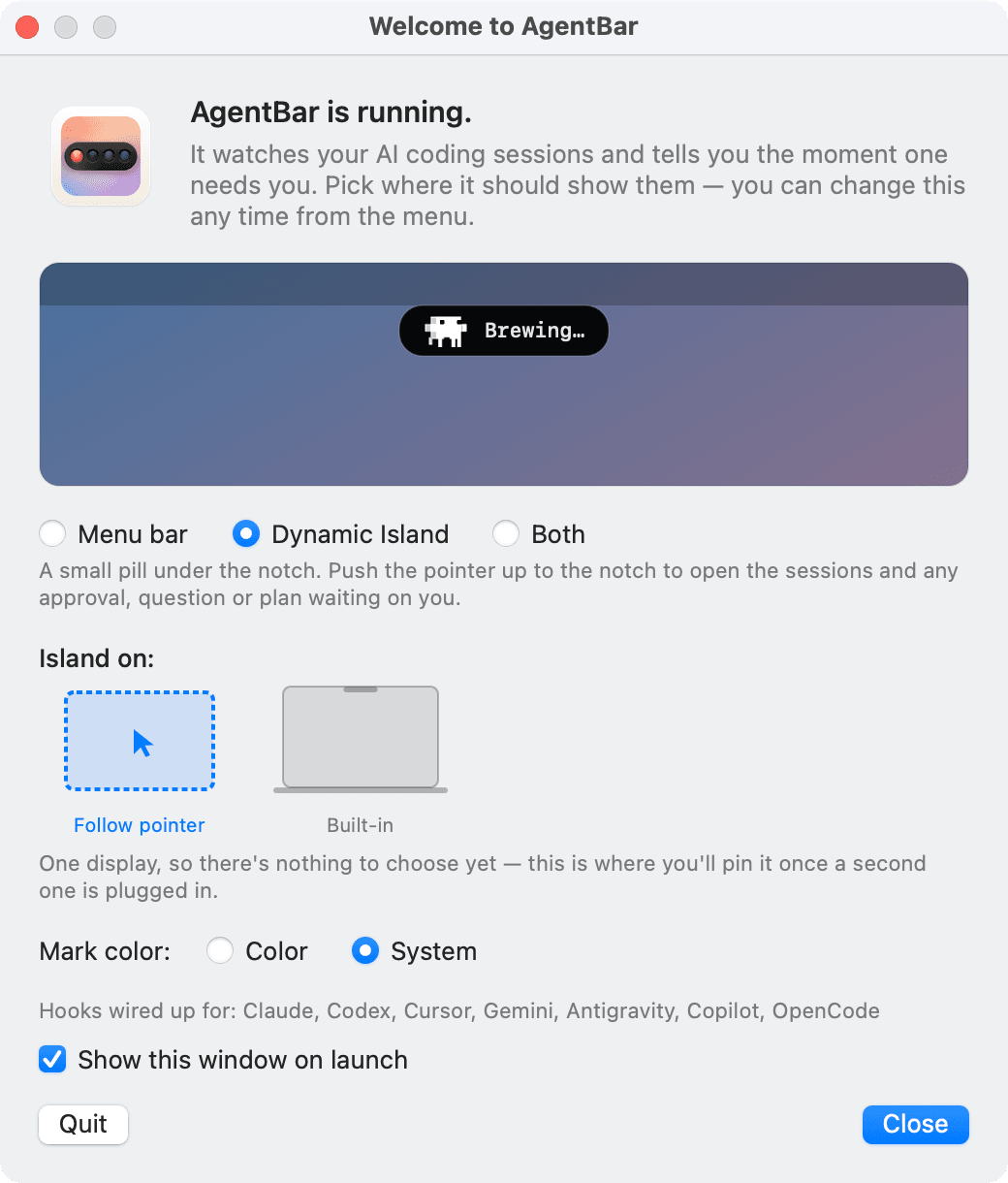
Since v1.10 AgentBar can live as a Dynamic Island: a small pill under the notch showing the working agent's mark and its task. Point at it and it opens into a full session panel — whatever needs you leads as a hero card, everything else is a quiet one-liner below. It never opens on its own, never takes focus from your editor, and falls back to a floating pill on displays without a notch.
The island is where answering grew past permissions. Claude's multiple-choice questions show as tappable option cards — a four-question call becomes a one-question-at-a-time wizard with a quiet “2/4” mark and Back. When Claude finishes planning, the whole plan renders as formatted Markdown, scrollable when long, with Keep planning (sends it back to refine) and Approve plan. A finished session says what it finished — one line of the agent's closing words under the green Done — and a quiet footer shows provider quota, read from the CLIs' own local files: no network, no keychain, nothing leaves the machine. Opt-in sound cues — four tiny synthesized retro-console motifs — mark the moments a session wants you.
engineering decisions
AgentBar is a clean-room rewrite of an earlier single-agent notifier concept, rebuilt around one bet: the simplest possible transport wins. State is plain JSON files in watched folders — the whole protocol is debuggable with ls and cat, survives crashes on either side, and adding an agent means adding a script that writes a file. It's now written down as a normative, OS-neutral spec — docs/protocol.md — and the macOS app, the Linux CLI and the Windows port are just three frontends against the same contract.
- A question is not an approval: when Claude asks something (AskUserQuestion — option pickers, plan questions), the session shows a blue dot with the question text instead of a false amber “needs approval”. Different urgency, different color.
- Races are the recurring bug class — so one writer per fact, and every delete checks ownership: v1.2.1 fixed sessions stuck on “needs approval” after a legacy hook overwrote fresh state; v1.12.0 caught a lingering hook deleting its successor's request file. Every destructive move now verifies the file is still its own.
- The terminal is never locked out: the terminal wizard stays live while AgentBar shows the same request — whoever answers first wins, the other side's answer is ignored cleanly, and a remote answer can only say things the request itself offered.
- Idempotent install: first launch merges hook entries into
~/.claude/settings.jsonpreserving whatever is already there, and touches Codex, Cursor, Gemini, Qwen or OpenCode configs only for the tools you actually use. The installer prints exactly what it changes before acting; reinstalling is always safe. - Permissions that survive updates: macOS keys TCC grants to the code-signing identity, and an ad-hoc signature is a new identity every build — so builds sign with a stable identity and Accessibility/Automation grants survive rebuilds and cask upgrades.
- Mascots as sprite frames rendered natively in AppKit — Clawd the crab for Claude, who acts out what the session is doing in twelve pixel-art scenes drawn as text in the source (a book while it reads, a hammer while it runs a command, a raised hand while it waits on you, asleep when nothing happens), each agent with its own mark — plus a monochrome System mode that matches the menu bar, with rotating thinking verbs while an agent works.
- Nothing else: no dock icon, no windows, no countdown timers, no sounds unless you turn them on. One process, tiny footprint.
rules you wrote yourself
For six releases one rule was absolute: every decision comes from a click. v1.28 amends it deliberately. A rule you typed yourself, in Settings ▸ Approvals, may answer a permission request the way you would have — but it is never derived from the Always allow that Claude Code suggests, because that suggestion is written by the thing being guarded. The card offers to write one down only once you have answered the same prompt the same way five times and never once the other way.
The same two months moved the bar from watching to doing. Cloud agents — Devin sessions, Cursor cloud agents, Codex cloud tasks — have no local process, pid or tty to hook, so a small poller gives them first-class rows and a click opens the run where it lives instead of a terminal. The island footer draws what is left of each quota rather than what was spent. Notifications carry Allow and Deny on the banner itself, off until you switch them on. And ⌥⌘N starts a new task in a chosen repository with the prompt already handed over.
what answers for you inside claude code
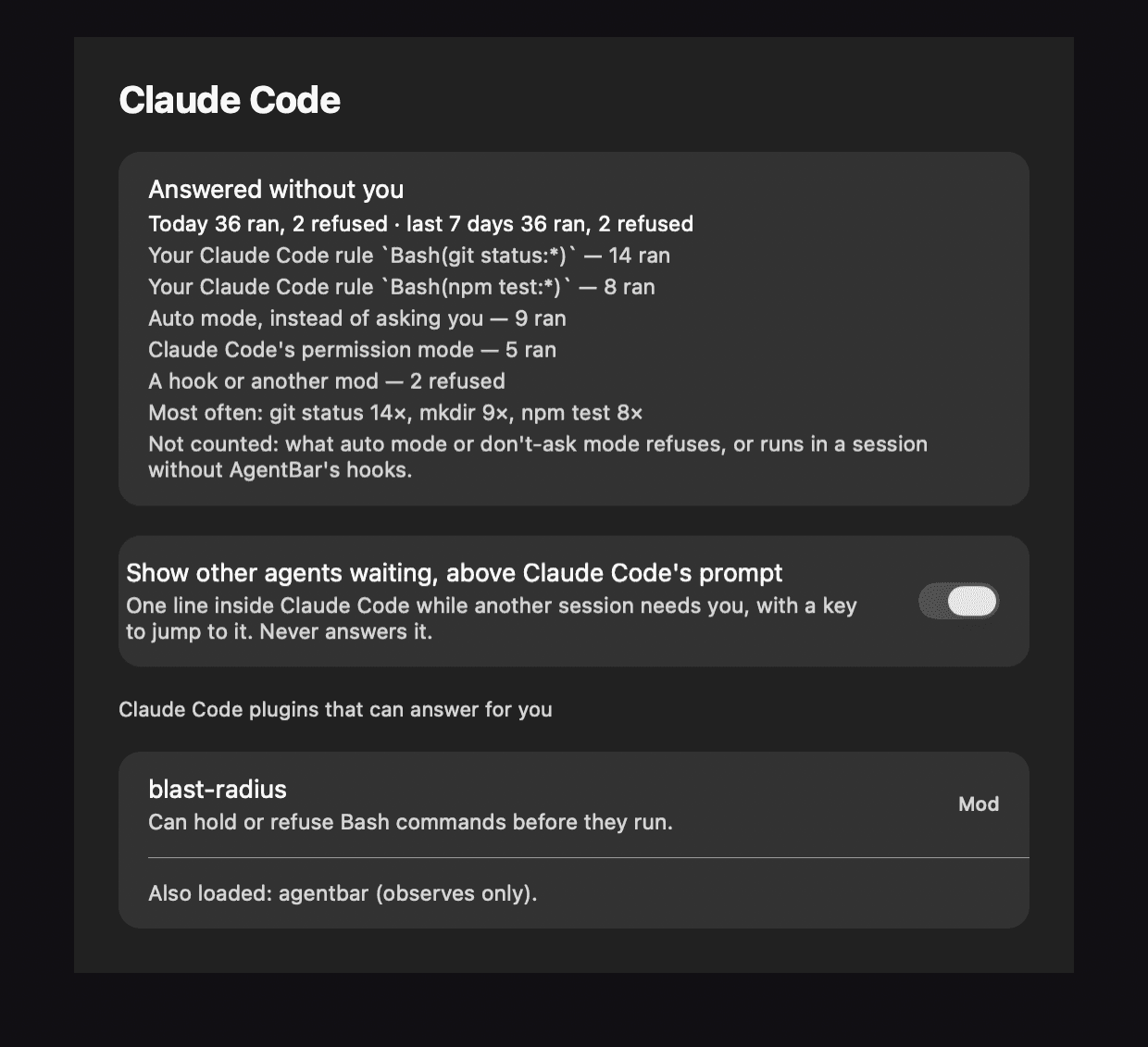
Claude Code 2.1.287 added mods: plugins whose code runs inside its process, sees every tool call and can approve one before anyone is asked. That is a new way for something to answer on your behalf, and AgentBar could not see it. v1.38 ships an AgentBar mod, off until you switch it on, that only observes: every hook hands Claude Code's own result back untouched, and CI pins what it may call so it cannot quietly gain a capability. It writes one file per session into mods.d/ — the same protocol as everything else.
What that buys is a page called Answered without you: what Claude Code ran or refused on its own, by your rule, its permission mode, a hook or another mod, and since v1.40 what auto mode ran instead of asking you. It lists the plugins that can answer for you, and it says what it cannot count: a refusal from auto mode comes back looking like a command that failed, so it is left out and the card says so. A command another mod holds — rm -r waiting in blast-radius for your answer — now shows as waiting on you instead of busy. And the same mod hands over Claude's quota live after every turn, plus a ctx 82% chip once a session's context window passes 70%.
take a break
v1.41 is the unserious release, and it follows the same rule as the serious ones. The joystick beside ⋯ in the island opens Space Bugs, a small Galaxian-style game: Clawd as the ship, a formation of bugs swaying and diving at you, double points for a diver, three ships, faster waves, a best score kept on this Mac. It opens only on that click and pauses the moment you click elsewhere — and it steps aside the instant an agent needs you: the game pauses, the island shows the request, and Back to the break picks up with the score intact for fifteen minutes.
Its blips play only with Sounds on, the stars hold still under Reduce Motion, and nothing of it runs while it is closed. The same day brought the dull, useful counterpart: release notes inside the app, in Settings ▸ What's New — what changed since you last looked and, while an update is on offer, what it brings before it installs. Nothing opens by itself.
bug hunt
v1.42 added a second game, and the joystick now offers both, the last one you played first. Bug Hunt plays by the rules of the old light-gun hunt, drawn in AgentBar's own pixels: the dog is ours, a beagle in Clawd's orange collar. He walks in, sniffs and jumps into the grass; bugs rise out of it one at a time (Game A) or in pairs (Game B).
You get three shots per flight. A hit bug freezes and tumbles into the grass, and the dog pops up holding it. Miss three times, or wait too long, and it flies away — the sky turns, and the dog laughs at you. A round is ten bugs; the hit bar says how many it needs, six at first and up to ten, and every round is faster. Aim with the pointer and click, or move a sight with the arrows and fire with Space. It keeps Space Bugs' rules to the letter: it opens only on your click, pauses when you click away, and steps aside the moment an agent needs you.
status & what's next
AgentBar is open source under MIT, at v1.56.0 — 74 releases, from the first multi-agent bar through remote Allow/Deny, the Dynamic Island, question wizards, plan review, cloud agents, usage meters, self-written approval rules that watch before they answer, approvals on your phone, a Claude Code mod that only watches, and two games that step aside for work. It installs with a one-line curl, a Homebrew cask, or by pasting the install command into your coding agent and letting it do the work; after that it updates itself at a quiet moment, checked against its own certificate. The agentbar CLI is a full peer of the menu bar app on Linux (status, watch with keyboard Allow/Deny, a waybar module), and AgentBar for Windows is a native system-tray counterpart speaking the same protocol.
Next, the work is less code than getting AgentBar in front of the people it is for, and the plan is public in the roadmap. On the product side: keystroke approval verified on real Codex and Copilot prompts, native Allow/Deny for Antigravity once its decision hook fires, remote approvals for Qwen Code once its decision contract is verified, and Claude Cowork sessions from the newer desktop builds, which run inside a VM that writes nothing the host can read. A notarized build waits until downloads show people want one; until then the builds sign with a stable local identity, so permission grants survive updates, and the install steps explain the Gatekeeper prompt a manual download brings up.
# one line — downloads the latest release, installs the hooks
curl -fsSL https://raw.githubusercontent.com/michalstrnadel/AgentBar/main/Scripts/install.sh | bash

# or via Homebrew
brew install --cask michalstrnadel/tap/agentbar

# then open a NEW Claude Code session and watch the bar